Blog
How to share passwords with a virtual assistant, and when you shouldn't
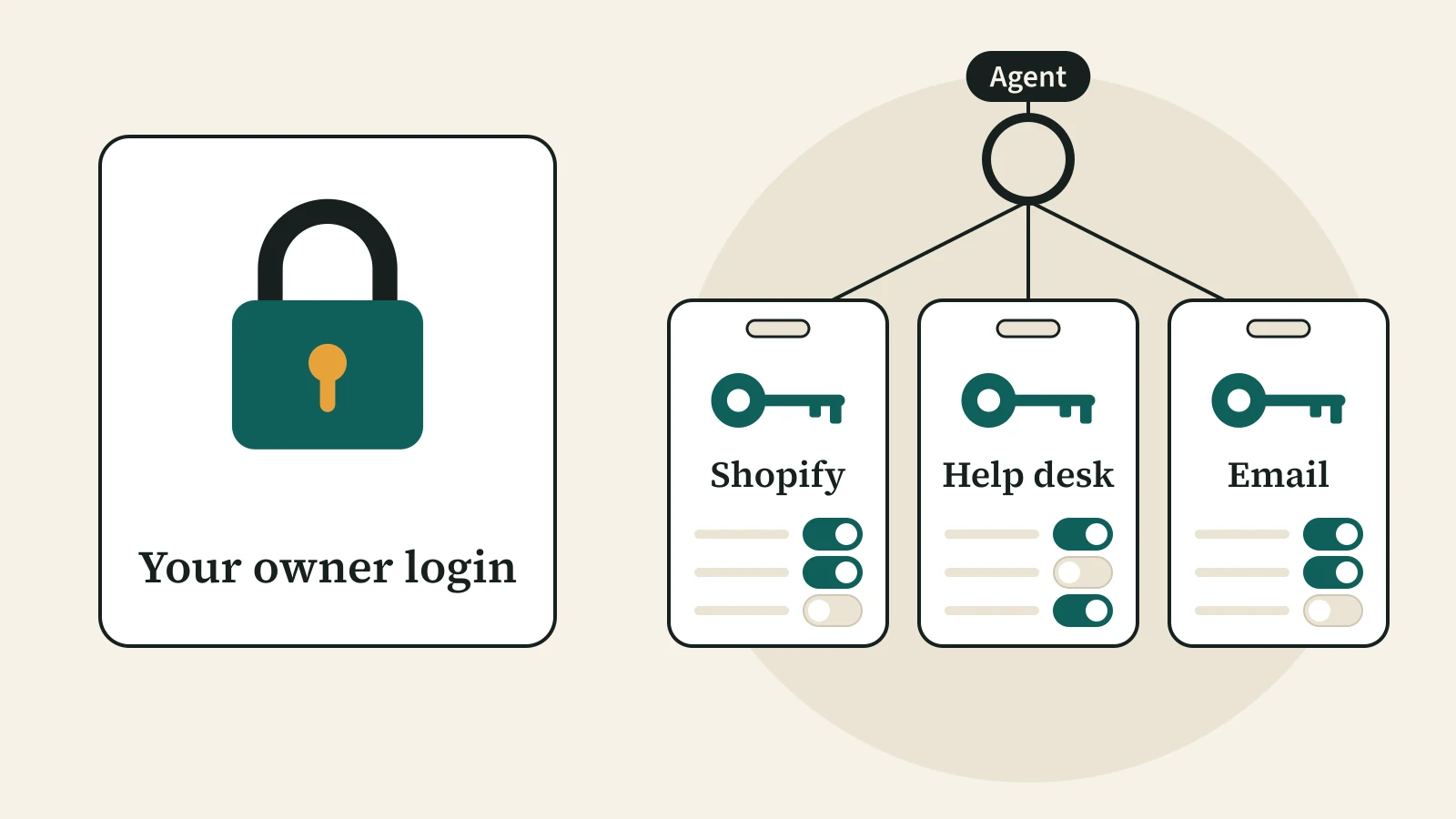
The safest way to share passwords with a virtual assistant is to share none of yours. Give the assistant their own login in each tool, with only the permissions the job needs, and keep two-factor codes in a shared vault, not on your phone. Shopify, Gmail, Outlook, the main help desks, Amazon Seller Central and field-service apps all have a built-in way to do this, though Shopify and Amazon limit it to certain plans. Below is what to give, what to keep, and how to remove it all on the day someone leaves.
Quick answer
- Never hand over the owner login. A named account per person shows who did what, and you can remove one person without changing your password.
- In Shopify, a support agent needs Orders and Customers permissions, not Finance, apps or the Administrator role. As of November 10, 2026, Basic allows no staff accounts and Grow allows five.
- For email, use Gmail delegation, a Google Group collaborative inbox or a Microsoft 365 shared mailbox. None needs your password.
- In Gorgias, Zendesk and Help Scout, the standard agent role answers tickets but cannot add users.
- Keep two-factor (2FA) codes in a shared vault, not in a text to your phone. The US cyber agency CISA ranks text codes as the weakest option.
- On the last day, suspend every account before the shift ends, then change any shared password.
Why shouldn't you give a VA your own password?
Because one shared login gives the assistant everything you can do, and you cannot take it back without locking yourself out. The US standards body NIST calls the fix least privilege. Control AC-6 in NIST SP 800-53 Rev. 5 says people should get only the access they need for their tasks. Its guide on logins, NIST SP 800-63B-4 (final, July 2025), says users are responsible for not sharing their login secrets with others.
A shared login also breaks your records: every refund and deleted email shows your name. A Seller Forums guide, "User Permissions Guide for Amazon Sellers" by the account Ezra_Amazon, puts it this way: "Do not share your password; use User Permissions to provide access instead." (Amazon Seller Forums, shown as posted 2 years ago when checked November 10, 2026.)
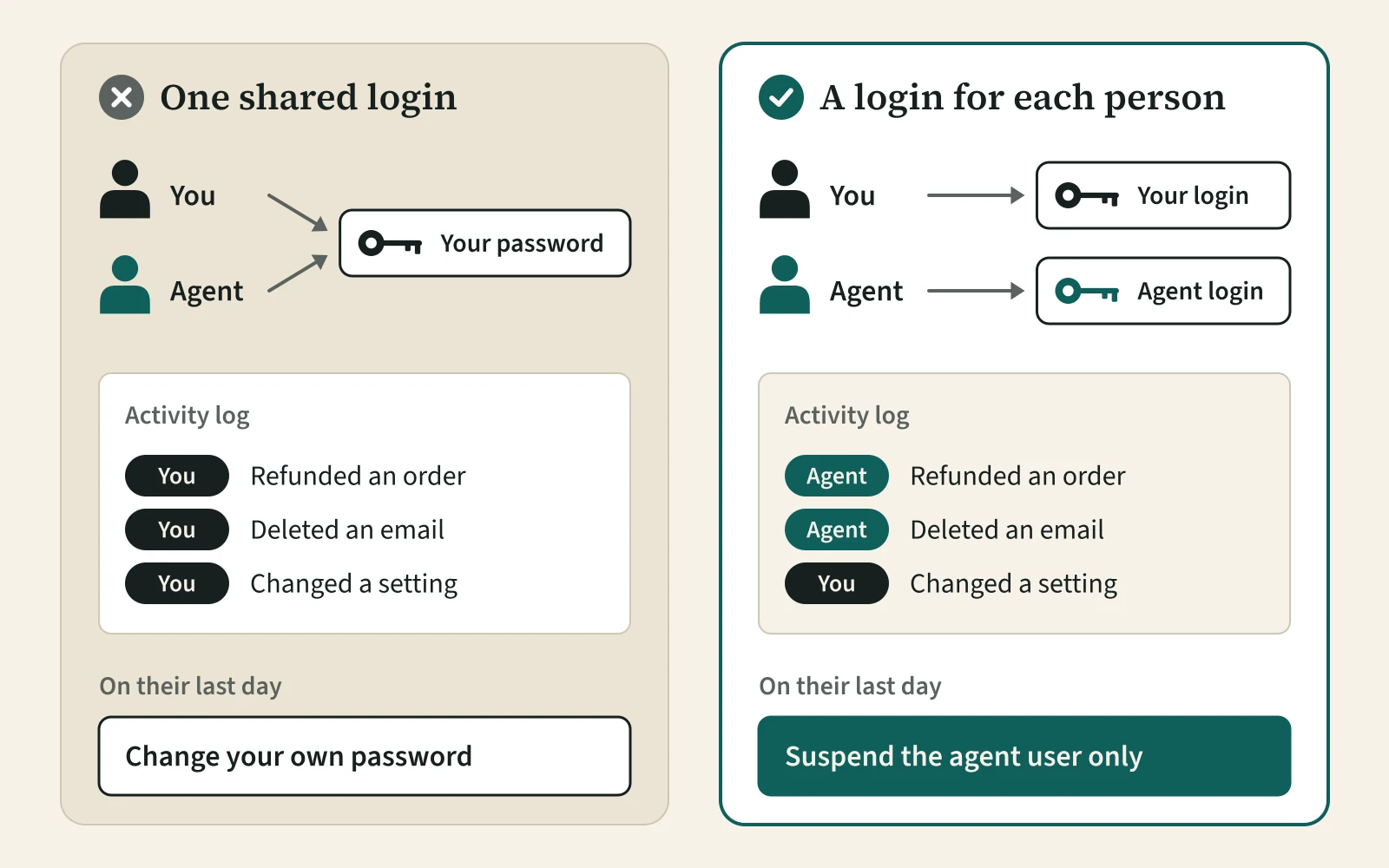
So if you want to share passwords with a virtual assistant, my answer for most tools is: don't. Create a seat instead.
What should a support agent get in Shopify and your help desk?
A support agent needs orders and customers, and nothing that moves money or changes who has access. In Shopify, you add the person under Settings, then Users, and tick each permission. Shopify's permissions list splits Orders into boxes such as View, Edit orders, Return, Refund to original payment method and Cancel. Tick only what your refund policy allows, and put the refund limit in writing in a customer service SOP. Under Customers, View and Create and edit are usually enough. Leave Finance, payments settings, apps and both Export boxes unticked. Do not give the Administrator role, because it can manage users.
As of November 10, 2026, Shopify's plan table allows no staff accounts on Starter or Basic, five on Grow, 15 on Advanced and unlimited users on Plus. On a Basic store, that limit can tempt you to share passwords with a virtual assistant. The fix is a plan with staff accounts.
Help desks work the same way. In Gorgias, the Basic role can reply, update tickets and refund a Shopify order from the ticket, but cannot manage users, billing or integrations. In Zendesk, agents cannot create or edit other agent or admin profiles. In Help Scout (updated November 5, 2026), a User sees only the inboxes you assign. The e-commerce support page shows the daily work in each tool.
| Tool | Give the agent | Keep for yourself |
|---|---|---|
| Shopify | A staff account with Orders (view, edit, return, refund within policy, cancel) and Customers (view, create and edit) | Administrator role, Finance, payments settings, apps, exports |
| Gorgias | Basic role | Admin role, billing, integrations |
| Zendesk | Agent role, in the groups they cover | Admin and account owner |
| Help Scout | User, with only the inboxes they answer | Administrator and account owner |
| Gmail or Google Workspace | Delegate access, or a seat in a collaborative inbox | Your password and account settings |
| Microsoft 365 | Their own licensed mailbox with access to a shared mailbox | Admin roles; sign-in to the shared mailbox stays blocked |
| Amazon Seller Central | A user with only the permissions the job needs | Your primary login |
| ServiceTitan | The CSR or Dispatch role | Accounting, payroll and settings |
| Housecall Pro | Office Staff, with pay details and company info turned off | Admin/Owner |
How do you give a VA access to email without your password?
You add the assistant through delegation or a shared inbox, and they sign in with their own account. In email, there is no need to share passwords with a virtual assistant.
- Gmail delegation. In Gmail settings, under Accounts and Import (Accounts on a work account), you grant access to another Google account. Google's help page says a delegate can read, send and delete mail but cannot change your password. Personal Gmail allows up to 10 delegates. On Google Workspace, the delegate must be in your organization, so the VA needs an account there.
- A Google Group collaborative inbox. Members can take, assign and mark complete the conversations sent to one address (Google Workspace help).
- A Microsoft 365 shared mailbox. Microsoft Learn (updated March 13, 2026) says it needs no license of its own up to 50 GB. Each user needs a licensed mailbox inside your organization, up to 25 users. Sign-in to the shared mailbox itself should stay blocked.
What about Amazon Seller Central, ServiceTitan and Housecall Pro?
Each has its own user system, so none of them needs you to share passwords with a virtual assistant. The rule is the same: one named user and a narrow role. On Amazon, User Permissions is open only to sellers on the Professional plan, per that forum guide.
ServiceTitan (updated October 16, 2026) ships default roles that include CSR and Dispatch. Leave its Accounting and payroll permissions off.
Housecall Pro has three types: Admin/Owner, Office Staff and Field Tech. An after-hours dispatcher fits Office Staff, with pay details and company account info off. Only one person can be the Dispatch/Messaging point of contact, and they get every customer text reply and online booking. The home services dispatch page covers what that dispatcher does on a shift.
When is a shared password vault the right answer?
Use a shared vault only for logins that cannot have a second user, such as an old supplier portal. If you must share passwords with a virtual assistant, use a separate vault in a password manager. Never paste them into a chat. 1Password lets you share one vault and choose whether a person can view, edit or manage it. Bitwarden can hide passwords, but its own help page warns this does not completely prevent access. Treat any password in a shared vault as known.
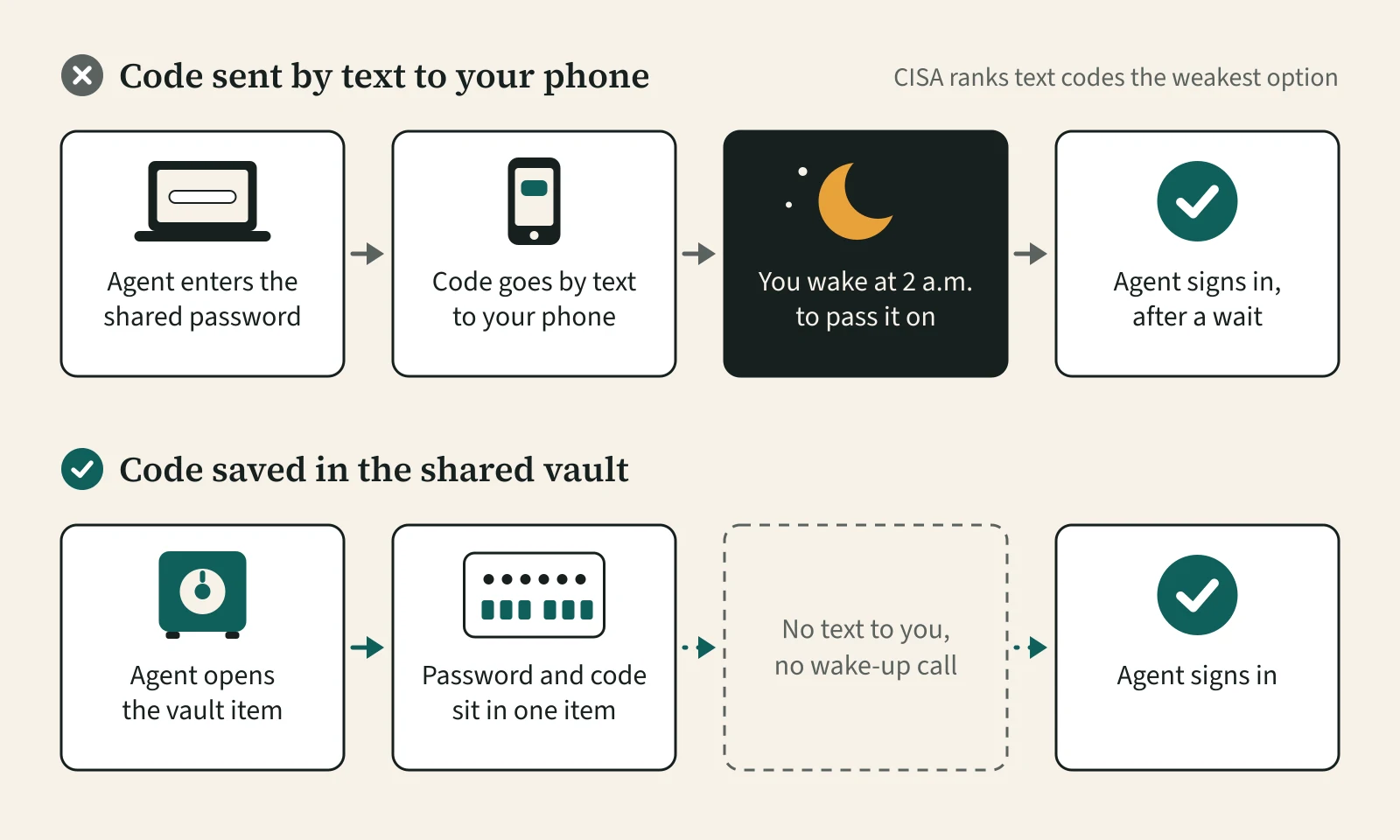
Two-factor codes are the snag when you share passwords with a virtual assistant. If the code goes by text to the owner's phone, the VA has to wake you at 2 a.m. CISA ranks text or email codes as the weakest form of multifactor authentication, below authenticator apps and security keys. NIST SP 800-63B-4 also marks codes sent over the phone network as restricted. A better fix is to save the one-time code in the vault item, which 1Password supports.
How do you remove access the same day someone leaves?
Suspend every account in one sitting before the person's last shift ends, then change any shared password they could see. In Shopify, suspending a user stops them logging in, and you can revoke access device by device. Each time you share passwords with a virtual assistant, you add a step to this list.
| When | Step | Where |
|---|---|---|
| Before the shift ends | Suspend the staff account and revoke its devices | Shopify: Settings, then Users |
| Before the shift ends | Remove or downgrade the help desk user | Gorgias, Zendesk or Help Scout user settings |
| Before the shift ends | Remove Gmail delegation, group membership or shared mailbox access | Gmail settings, Google Groups, Microsoft 365 admin center |
| Same day | Remove the Amazon user | Seller Central User Permissions |
| Same day | Turn off the dispatch user | ServiceTitan or Housecall Pro user settings |
| Same day | Remove them from the vault, then change each password in it and reset its 2FA | Your password manager |
| Within a week | Read the activity log for anything unusual | Each tool that keeps one |
When does a supervised office team make sense?
It makes sense when you want someone else to run the agent's day and check the work. In the model this site introduces, agents are employed by our partner provider in Davao City and work from its office. A team lead supervises up to 15 agents and replies, usually the same business day. You still create the logins above in your own tools, so you can remove them at any time. I have not confirmed device controls, so ask on the call whose computers the agent uses and what is blocked on them.
For your customers' data, your own country's privacy law stays the main rulebook, alongside the Philippine Data Privacy Act of 2012. If the agent will see patient records, read about the business associate agreement first. Read how it works, or describe the role you need. I am paid a commission by the provider for clients I introduce.
You do not need this if a trusted freelancer covers the work in a few hours a week. Three tests on your own data show when that stops being enough. The same goes if the real fix is fewer tools. Then set up the named accounts yourself.
Recap: share passwords with a virtual assistant
The best way to share passwords with a virtual assistant is to share as few as you can. Give each tool its own named user with the narrowest role, and keep two-factor codes in a shared vault. Suspend everything on the last day.
Reviewed November 2026. Plans, roles and permission names change; confirm current settings in each vendor's own help pages.
Questions buyers ask
Is it safe to give a virtual assistant my password?
Rarely. A shared owner login gives the assistant everything you can do, logs their actions under your name, and cannot be taken back without changing your own password. Most support tools, including Shopify (Grow plan and up), Gmail, Microsoft 365, Gorgias, Zendesk and Amazon Seller Central, let you add a separate user with a narrower role instead.
How do I give a VA access to my email?
Use delegation or a shared inbox, not your password. In Gmail, add the assistant as a delegate under Accounts and Import (Accounts on Google Workspace); on Workspace they need an account in your organization. In Microsoft 365, give them a licensed mailbox with access to a shared mailbox. A Google Group collaborative inbox also works for one support address.
How does a VA get two-factor codes without texting me?
Store the one-time code with the login in a shared password manager vault, which 1Password supports, so the assistant gets the code without waking you. That ends the late-night text to the owner's phone. CISA ranks text and email codes as the weakest form of multifactor authentication, so moving away from them also helps.
What should I do on a virtual assistant's last day?
Suspend or remove their user in every tool before the shift ends, starting with Shopify, email and the help desk. Then remove them from any shared vault and change each password they could see, along with its two-factor setup. A separate named account in each tool turns this into a short checklist instead of a weekend job.
Related reading
Sources
- NIST SP 800-53 Rev. 5, control AC-6 Least Privilege (only the access needed for assigned tasks), National Institute of Standards and Technology, checked November 10, 2026.
- NIST SP 800-63B-4 (final, July 2025): subscribers do not disclose authentication secrets; phone-network codes are restricted, National Institute of Standards and Technology, checked November 10, 2026.
- Require multifactor authentication (text or email codes give the weakest protection), Cybersecurity and Infrastructure Security Agency, checked November 10, 2026.
- Store permissions (Orders, Customers, Finance, Apps and channels), Shopify Help Center, checked November 10, 2026.
- Maximum number of users for each pricing plan (Starter 0, Basic 0, Grow 5, Advanced 15, Plus unlimited), Shopify Help Center, checked November 10, 2026.
- Managing users from your Shopify admin (suspend, remove, revoke device access), Shopify Help Center, checked November 10, 2026.
- User permissions (Observer, Lite, Basic, Lead and Admin roles), Gorgias, checked November 10, 2026.
- Understanding standard user roles for Zendesk Support (agents cannot create or edit other agent or administrator profiles), Zendesk, checked November 10, 2026.
- User roles and permissions (updated November 5, 2026), Help Scout, checked November 10, 2026.
- Delegate and collaborate on email (up to 10 delegates; delegates cannot change your password), Google, checked November 10, 2026.
- Make a group a Collaborative Inbox (members take, assign and mark conversations complete), Google, checked November 10, 2026.
- About shared mailboxes in Microsoft 365 (updated March 13, 2026; no license up to 50 GB; up to 25 users; block sign-in), Microsoft Learn, checked November 10, 2026.
- User Permissions Guide for Amazon Sellers (forum post by Ezra_Amazon, shown as 2 years old: do not share your password; Professional plan only), Amazon Seller Forums, checked November 10, 2026.
- Office employee permissions in ServiceTitan (updated October 16, 2026; default CSR and Dispatch roles), ServiceTitan, checked November 10, 2026.
- Team Member Roles and Permissions (updated September 14, 2026; Admin/Owner, Office Staff, Field Tech; one Dispatch/Messaging POC), Housecall Pro, checked November 10, 2026.
- Create, share, and manage vaults in your organization (published August 7, 2026; view, edit and manage permissions), 1Password, checked November 10, 2026.
- Use 1Password as an authenticator for sites with two-factor authentication (published November 4, 2026), 1Password, checked November 10, 2026.
- Collection permissions (hidden passwords do not completely prevent access), Bitwarden, checked November 10, 2026.
We publish what the provider has confirmed in writing. If a figure is not here, we have not been able to confirm it.